
Essentials
Time data recording supports the following infotypes:
- 2001 – Absences
- 2002 – Attendances
- 2003 – Substitutions
- 2004 – Availability
- 2005 – Overtime
- 2006 – Absence quotas
- 2007 – Attendance quotas
- 2010 – Employee remuneration info
- 2011 – Time events
- 2012 – Time transfer specifications
- 2013 – Quota corrections
As one prerequisite the IT0007 (planned working time) has to be maintained, which contains the work schedule of an employee, the working hours (per day, week, month or year) and the time management status. This work schedule has to be generated per Employee subgroup grouping, Holiday calendar, Personnel subarea grouping and
Work schedule rule e.g. via transaction PT01.
The work schedule itself can be directly maintained in the tables T508A (work schedule rule), T550A (daily work schedule), T550P (work break schedule) and T551A (period work schedule).
Important tables for IT2001/IT2002 are T554S, T582A and T554Y.
In table T554S the definition of absence or attendance types is done. Here you can decide whether a quota deduction takes place (screen number 2001 for absences and 2050 for attendances, flag ‘quota deduction’), which kind of input checks to be performed, the time constraint class for possible collisions etc.
The table T554Y uses the ‘time constraint’ settings to specify the system reaction to overlapping time infotypes. It will either issue an error (‘E’) or a warning (‘W’), no reaction (‘N’), or delimits the old record (‘A’).As a prerequisite the ‘time constraint’ for time infotypes has to be set to ‘Z’ in the infotype attributes settings (T582A). Among others, the ‘Retroactive acct. relevance for PDC time evaluation’ is quite important, as it decides whether a retrocalculation is triggered whenever changes on an infotype record are performed.
The absence quota infotype IT2006 should be used instead of the old IT0005 (leave entitlement) as it offers more functionality. Important customizing tables are T556A for absence quota types and T556P for attendance quota types. T559L can be used as a central point to check e.g. the selection rules, validity/deduction interval, base entitlement and accrual period.
Infotype Customizing
Infotype attributes > view V_T582A
- time constraint > always ‘Z’ for time infotypes
- subtype table
- display and selection (‘default’ values)
- retroactivity: important here entry ‘R’ and ‘T’. ‘T’ > further customizing in table T588G (retroactivity is field-dependent)
- technical data > single screen and list screen. Alternative screens possible via table T588M. For list screen further specification possible via T582Z.
special for absences/attendances > view T554S
- important > F1-help on certain fields
- screen number > quota deduction only with screen 2001 (absences) and screen 2050 (attendances) > country specifc screen (e.g.2005 – Netherlands)
- availability > BAPI_TIMEAVAILSCHEDULE_BUILD
- time constraint class > collision of time infotypes
- quota type (‘old’ and ‘new’ deduction, leave)
- counting rule
- quota deduction
- deduction over interval end
For transaction PA71 the customizing of screens is done via T588Q.
Transactions in Time Management (PT–RC and PT–WS)
PA30/PA20 (maintain/display master data)
- ‘special’: delimit function (this function is not possible with PA61. The delimit function is also possible within PA40 > typical case)
- also in PA61 > Utilities > change payroll status (infotype 0003)
- also in PA61 > special ‘entry’ in some fields, e. g.
- infotype: 2002/01, all possibilities for time data > 2*
- begin/end data: w (weekly), , m (monthly), j (yearly)
- clear field with ‘!’
- personnel number (match code)
PA61/PA51 (maintain/display time data)
- ‘special’ functions:
- list entry
- weekly calendar (infotype 2052)
- monthly calendar (infotype 2051)
- annual calendar (infotype 2050)
PA62 (maintain additional time data)
- very seldom used
PT69 (For multiple persons and infotypes > report RPTENT00)
- should not be used anymore
- recommendation from SAP to use transaction PTMW starting with release 4.6C (consultancy note 746999)
- starting with release 4.7 transaction PT69 is withdrawn from the SAP Easy Access menu (here interesting: Extras > settings > Display technical names).
PA70 (fast entry of master data) and PA71 (fast entry of time data)
- in this case the same functionality (comparing with single entry) > other entries for infotypes (as default values > customizing of master data)
Important Reports
Human Resources > Time Management > Administration > Tools > Tools Selection
- Cluster (Display cluster information)
- RPCLSTPC – display pers. Calendar (PC)
- RPCLSTB1 – temp. time evaluation results
- RPCLSTB2 – time evaluation results
- Absence/attendance:
- RPT55400 > better here: SM31 > T554S
- RPTUPD00 > see also documentation of this report. This is only relevant for PA30/PA61. In TMW this is done automatically when attendances/absences are processed
- RPTBPC10 > very important report in case of inconsistencies in quota deduction (normally table PTQUODED). This report is normally started from report RPTKOK00. Important things here: no recalculation (infotype 0003). Also important are the parameters and the time period! See also note 534275 for the sequence of quota deduction > modifiying Include RPTBPC10_DED_ORDER!
- RPTLEA30: this report is only for infotype 0005 (annual leave). For infotype 2006 there is report RPTQTA00. Report RPILVA00 is only for infotype 0005
- RPTLEACONV: see also notes 185963 and 366686. Changing from infotype 0005 to infotype 2006
- Work schedule
- RPTSHF00 (see also user-exit ). Generate work schedules. Transaction PT01. Customizing table T508A. Entries are generated in table T552A
- RPUTPR00: recalculate daily work schedules. This report is also in the IMG. It has to be used when a break schedule is changed > new evaluation of the work schedule
- RPUWSH00: recalculate planned working time. Change of infotype 0007
- RPTBPC00: generate personal calendar (cluster PC). The calendar will be generated year by year.
Further Reports in Time Management
*** Use only as an exception > delete cluster data in case of inconsistencies ***
First in the test system!
RPUP1D00: PCL1 > display and delete single entries
RPUP1D10: PCL1 > deletes a number of entries
RPUP2D00: PCL2 > display and delete single entries
RPUP2D10: PCL2 > deletes a number of entries
- Before running please have a look at the report documentation
- Special case RPUP1D00: please see F1-help on the selection screen. Often the field ‘Password’ leads to ambiguity. You only have to enter your SAP username here (field sy-uname). You could use transaction SE16 to display the keys of the cluster entries. As tablename type in PCL1; in field RELID you get the available cluster tables via F4-help. To find out the entries for employee 802100 in cluster PC use the following values:
- RELID = PC
- SRTFD = 802100
- In this example above there is one entry per year (cluster PC = yearly calendar)
- The content can be displayed with report RPCLSTPC
- For cluster B2 there exists table name PCL2 (report RPCLSTB2)
IMPORTANT: From an PT–RC view it is possible to delete cluster PC (in case of problems via an upgrade). It is possible to re-generate the data. In other countries this is different. Make sure that function XNAB is not used in payroll. If it is used, this function stores data of absence splitting process in table COVER on cluster PC
XPRAs (see also note 358014)
*** Normally these reports are run during an upgrade ***
RPUABSATT00: XPRA > fills internal document numbers for absences/attendances
RPUABSATT50: XPRA > fills internal document numbers for absences/attendances
RPUQTA00: XPRA > switch to quotas
RPUQTA50: XPRA > switch to quotas
Important Tables and Views
T001P V_T001P Personnel Area/Subarea
T503 V_503_ALL Employee Group/Subgroup
T508A V_T508A Work Schedule Rule
T550A V_T550A Daily Work Schedule
T550P V_T550P Work Break Schedule
T551A V_T551A Period Work Schedule
T551C V_T551C Period Work Schedule Valuation
V_551C_B Valuation Class for Period Work Schedule
T554Y V_554Y_B Time constraint Reaction (‘collision’)
T556A V_T556A Absence Quota Type
T556P V_T556P Attendance Quota Type
T556C T556C Counting rule (and overview/’links’!)
T556R V_T556R Deduction rules for Attendance Quotas
V_556R_B Deduction rules for Absence Quotas
T559L V_T559L Selection rules (and overview/’links’)
T588D V_T588D Info Group overview (PA40)
T588G V_T588G Field-specific recalculation
T588M V_T588M Infotype screen control (display/hide certain fields)
T588Z V_T588Z Dynamic actions
T777D T777D Infotypes – Assignments
T552A Monthly Work Schedule
Features in PT
QUOMO Determination of quota type selection rule group
HRSIF Recording atts./absences without clock times
LLREP Time management: Variants for Reports
I0005 Set control parameters for infotype 0005
LVNUM Defining Leave Entitlement per Leave Type
LVTYP Defining Leave Types
VAC* Defining Leave Type/Leave Entitlement
see also documentation of RPILVA00
Special functions ‘after’ saving an infotype record (this is handled similar for PA30 and PTMW)
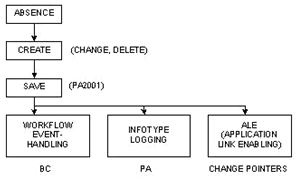
- creating of workflow events > function module HR_EVENT_CREATE (note 532102)
- creating of change documents > CL_PT_BLP_INFOTYPE > method CREATE_INFOTYPE_LOG > function module HR_INFOTYPE_LOG_CREATE (note 690227). In PA30 via forms (no function module)
- write change pointers for ALE > function module RH_INFTY_CHANGE_PROT (note 514565)
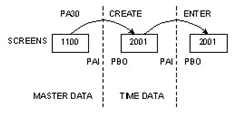
Debugging: breakpoint / watchpoint / breakpoint at statement message or at a specific function module. Important: call stack and only have a look at the ‘big picture’. Details are normally not so important at first. PA30: e. g. field p2001-enduz.
Important here: PBO/PAI. E. g. MP200000 > screen 2001 > calling of modules (always a good-starting point). System/global variables like sy-dynnr, ps, psyst, pspar, p2001 and so on…
In the attributes of a program (in SE38, normally via menu > System > Status) you could find the development class to which the program belongs. By double-clicking you will see the application component of the program. Unfortunately this is not correct for ‘older’ programs. But normally it is a good starting point to figure out if it is a time management program (PT) or maybe it belongs to HR master data (e. g. overview screen of PA61).
Absence Quotas
Default values for absence quotas:
IT2006 -> V_T559L: Absence quotas / default values
– PA61 (manually)
– RPTQTA00 (normally in a batch)
– RPTIME00 function QUOTA
- default values for quotas (via customizing). When no subtype is entered this could take quite long (e. g. for a year)
- button ‘default values’. This could be also used for ‘testing’ purposes. Clear field ‘quota number’ and play around with begin and end date (e. g. if the quota number depends on seniority)
- function module: HR_QUOTAS_DEFAULT_AT_ENTRY (calls function module HR_QTACC_QUOTAS_GENERATE. This function module is also called in function QUOTA of RPTIME00)
Deduction of attendances/absences:
function module HR_DEDUCE_QUOTA
- quota deduction (infotype 2006)
special case: infotype 0005
- MP200000 FORM deduce_leave
table T554S
- T554S-KTART = ‚99′ > infotype 0005 (leave)
- T554S-KTART not initial but <> ’99’ > ‘old’ quota deduction (via infotypes 2006 and 2007; normally direct entry of quota type) > T554X : Rules for Att./Abs. counting and leave deduction
- Quota multiplier in ‘old’ rules only works for quota types with unit ‘days’. message 9200 2000
- T554S-DEDQU not initial > ‘new’ quota deduction; here the counting rule (specified in T554S-CRULE) is a must, this counting rule is linked to a deduction rule, in the deduction rule the relevant quota types are specified
T554S – Counting Rule – T556C- Important: deduction rule within and over entitlement; for negative deduction rule over entitlement has to be specified
T554S-KTART (=quota type, which defines the method of deduction)
– 00 or initial (coding blank) -> 2006 (new)
– 01 – 98 -> 2006 (old method, seldom)
– 99 -> 0005
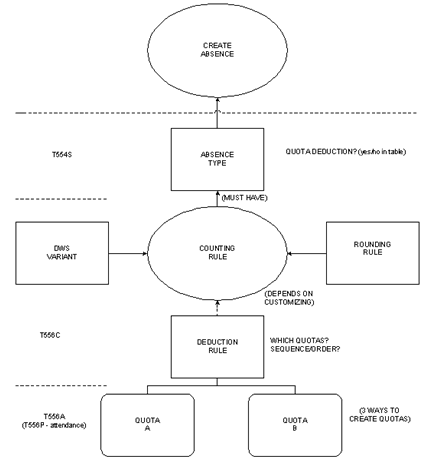
How the tables are ‘linked’ to each other:
- example: Absence record on current day
- menu of infotype 2001 record > Goto > Deduction (PTQUODED entry). For records deducting from infotype 0005 it is > Edit > Leave deduction
- menu of corresponding infotype 2006 record > Goto > Deduction (PTQUODED entry resp. PTQUODED entries for this quota)
- check in PA2001, PA2006, PTQUODED: PA2001-DOCNR, PA2006-QUONR > check these entries in table PTQUODED (PTQUODED-QUODE)
- important fields in PA2006 > PA2006-ANZHL, PA2006-KVERB
How the customizing tables are ‘linked’ to each other
- counting rule (T554S-CRULE) for an absence subtype (T554S-SUBTY) and flag quota deduction (T554S-DEDQU)
- the deduction rule is entered in the counting rule
- the quotas are entered in the deduction rule
- example here: absence subtype 0100
- counting rule 010
- two counting rules in further customizing table (T556C-CRULE)
- corresponding deduction rule 010 (T556C-DEABP)
- absence with subtype 0100 could deduct from quota types 10 and 11 (see also priority)
- the quota types are defined in table T556A (T556A-KTART). Here you can also enter a time constraint class (T556A- KLZBI) to use in collision check
- special case for attendance quotas (table T556P). Attendance quotas can be deducted either by attendances (time recording) or by RPTIME00 > T556P-DEDTI and DEDDI
- for the calculation of absence quotas there is also the possibility to define an accrual via RPTIME00 or manually (default values)
- customizing for the generation of absence quotas > V_T559L
Time quota compensation
- function module HR_SETTLE_QUOTA. Important here: again function module HR_DEDUCE_QUOTA is called. A compensation is another ‘possibility’ to deduct absence quotas (besides the absences).
- form of compensation
- compensation rule with deduction rule
- compensation rule with quota type
- free compensation
- consultancy note 704506 (compensation of ‘locked’ quotas)
– with note: not only latest record is read, reads 2006-records for 2022, 2023 … - special case: HR_SETTLE_QUOTA > parameter IGNORE_INTERVAL:
– IGNORE_INTERVAL = ‘X’ < comment
– IGNORE_INTERVAL = ‘ ‘ < insert
deduction intervals are processed in quota deduction but not in quota compensation
‘Additional data’ for time infotypes
Customizing in these modules (how many fields are shown):
- activity allocation
- function module RP_TIME_COBL_001 (popup)
- cost assignment
- function module RP_TIME_COBL_002 (popup)
- external services
- function module RP_TIME_003 (popup)
- different payment
- module of MP200000, screen 2221
- view V_582A_C (what infotypes in general) and specify further (see also ‘areas’ above) in view T582Z (per infotype)
- specify objects for each ‘area’
RPTPDOC0: transfer additional data for activity allocation to accounting
delimit function
- normally used in actions (e. g. organizational change) > end-date of infotype is changed
- Special function of ‘partial delete’ of an absence quota. For details please see note 383632 > begin-date of infotype is changed (the ‘end’ of the infotype-record is deleted)
Collision of time infotypes
- PA61 /PA30
(also automatic delimitation of infotypes). ‘old’ program: SAPFP51Z > INCLUDE FP51ZE00- Up to 4.6C ‘old’ collision
- 4.7 ‘new’ collision
function modules: HR_TIME_COLLISION; HR_TIME_DELIMIT
- TMW (4.6C / 4.7) ‘new’ collision
function module: HR_TIME COLLISION
TMW does not support automatic delimitation (note 447097)
User-Exits and BADIs in Time Management
User-Exits (transaction SMOD and CMOD)
PTIM2001 Time recording: Default values for activity allocation
PTIM2002 Time recording: Default values for cost assignment
PTIM2003 Time recording: Default values for external services
PTIM2004 Time recording: Validation of activity allocation
PTIM2005 Time recording week screen: Attendance/absence type def
PTIM2006 Time recording week screen: Complete validation
PTIM2007 Generate Monthly Work Schedule
PTIMTMW Customer-Specific Fields in Table Controls for TMW
own columns: just for display, only in overview
HRPTIM01 Customer Enhancement for HR Time Management EXIT_MP000500_001
HRPTIM02 User exits for HR Time Management: Leave accrual
HRPTIM03 Time Management Enhancement: Absence Quota Deduction EXIT_SAPLHRLV_*
HRPTIM04 Modification of cluster B2 data after import in RPTEDT0
HRPTIM05 User exit for HR Time Management CC1
HRPTIM06 Customer Enhancement for HR Time Management Leave Request
HRPTIMAB Define absence explicitly
HRPTIMEW User exit for HR Time Management: Transfer ext. wage type
BADIs (transaction SE18 and SE19)
– SE95 to find out about BADIs (no transaction for User Exits)
– Status: activated / not activated!
– Possible BADIs: PA30/PA61, HR-authorizations, PT_BLP_USER for TMW
PT_BLP_USER main BADI for TMW business logic (note 367249. The activation is not necessary anymore)
PT_ABS_ATT_COUNTRY absence/attendance counting (note 383750)
– country specific coding
PT_QUOTA_DEDUCTION BAdI for quota deduction
PT_QUOTA_DEF_VAL BadI for default values (quotas) – processed in PA61
PT_GUI_TMW_CALENDAR default values in TMW calendar
PT_GUI_TMW_TDE_NM TMW teamview: fill customer fields
Leave A Comment?
You must be logged in to post a comment.