
Steps are –
- Call Function Module PYXX_GET_RELID_FROM_PERNR to get the area identifier for cluster in tables PCLx.
CALL FUNCTION ‘PYXX_GET_RELID_FROM_PERNR’
EXPORTING
employee = pernr-pernr
IMPORTING
relid = relid
molga = molga
where relid is Area Cluster Identifier and molga is Country Grouping
- Call Function Module CU_READ_RGDIR Passing the Values of molga(Country Grouping from previos Function module)
CALL FUNCTION ‘CU_READ_RGDIR’
EXPORTING
persnr = pernr-pernr
IMPORTING
molga = molga
TABLES
in_rgdir = in_rgdir
where in_rgdir contains cluster Directory (For Export and Import of Payroll Results)
- Call Function Module CD_READ_LAST for Reading the RGDIR directory with latest valid record
CALL FUNCTION ‘CD_READ_LAST’
EXPORTING
begin_date = pnpbegda
end_date = pnpendda
IMPORTING
out_seqnr = out_seqnr
TABLES
rgdir = in_rgdir
where pnpbegda is the Latest Begin date, pnpendda is the Latest End date, out_seqnr is the sequence number and in_rgdir contains Cluster Directory
- Call Function Module to retrieve Payroll Results
PYXX_READ_PAYROLL_RESULT
CALL FUNCTION ‘PYXX_READ_PAYROLL_RESULT’
EXPORTING
clusterid = relid
employeenumber = pernr-pernr
sequencenumber = out_seqnr
CHANGING
payroll_result = it_result
The Payroll Results are collected in Internal Table It_Result.
Business Scenario –
It is very common for any SAP Payroll project, one report for Net payment is developed. Here we will learn how to use these FM to develop a Net Payment Report.
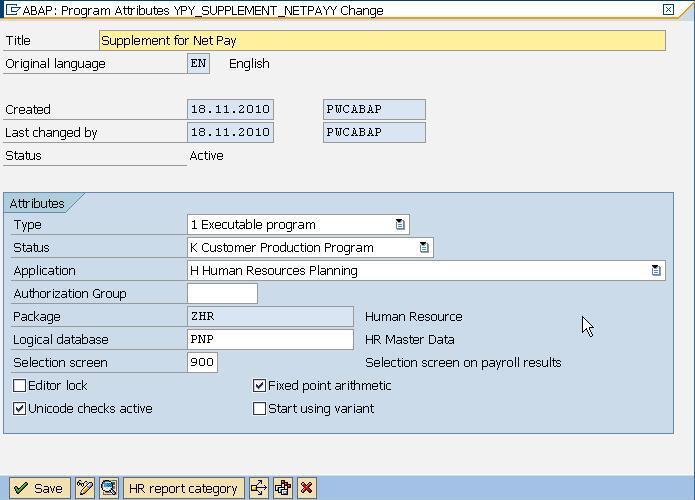
- Creating a report ‘YPY_SUPPLEMENT_NETPAYY’ with following details and don’t forget to include PNP and Selection Screen 0900.
- The Sample code is
REPORT ypy_supplement_netpayy NO STANDARD PAGE HEADING
MESSAGE-ID ypayroll
LINE-SIZE 255
LINE-COUNT 50.
TABLES: rp50g, pernr, pyorgscreen, pytimescreen.
DATA : relid TYPE relid_pcl,
molga TYPE molga.
DATA: in_rgdir LIKE pc261 OCCURS 0 WITH HEADER LINE,
out_seqnr LIKE pc261-seqnr,
it_result TYPE pay99_result,
wa_rt LIKE pc207 OCCURS 0 WITH HEADER LINE.
START-OF-SELECTION.
GET pernr.
* Get the area identifier for cluster
CALL FUNCTION ‘PYXX_GET_RELID_FROM_PERNR’
EXPORTING
employee = pernr-pernr
IMPORTING
relid = relid
molga = molga.
* Read RGDIR, Cluster CU
CALL FUNCTION ‘CU_READ_RGDIR’
EXPORTING
persnr = pernr-pernr
IMPORTING
molga = molga
TABLES
in_rgdir = in_rgdir.
* Reading the RGDIR directory with latest valid record
CALL FUNCTION ‘CD_READ_LAST’
EXPORTING
begin_date = pnpbegda
end_date = pnpendda
IMPORTING
out_seqnr = out_seqnr
TABLES
rgdir = in_rgdir.
* Import of Payroll Results
CALL FUNCTION ‘PYXX_READ_PAYROLL_RESULT’
EXPORTING
clusterid = relid
employeenumber = pernr-pernr
sequencenumber = out_seqnr
CHANGING
payroll_result = it_result.
* Need to read the result table.
LOOP AT it_result-inter-rt INTO wa_rt.
CASE wa_rt-lgart.
WHEN ‘/559’.
* MOVE wa_rt-betrg TO t_table-wagetype.
ENDCASE.
ENDLOOP.
Leave A Comment?
You must be logged in to post a comment.